

Table of Contents (21 Sections)
A dead key fob battery does not strand a push button car. Every maker builds in a backup that reads the fob at touch range, and the backup needs no battery power in the fob at all. Open the door with the metal key hidden inside the fob. Sit down, hold the brake, and put the fob at the one spot your car reads it from. That spot differs by make, and the wrong spot gives you a silent button. Find your make below and follow its steps in order.

Why a dead fob still starts the car
Your fob does two separate jobs. The coin battery powers the remote buttons and the proximity radio that lets the car hear the fob from your pocket. A passive chip inside the fob does the security handshake, and that chip needs no battery. Reader’s Digest, quoting AAA master technician David Bennett, puts it in one line: a dead fob battery will not work from afar, but it should work up close.
The car powers that chip for a split second when you hold the fob at the reader. The reader sits in the start button on some cars, under a marked spot on the steering column on others, and inside a console pocket or slot on the rest. Hold the fob at the reader and the car can confirm the chip code with the fob battery fully dead. Move the fob even a few inches away and the read fails. Distance is the whole trick.
No bench test stands behind this guide. Every spot, side and timing window below comes from a maker manual, a dealer page, or a named source opened for this post and listed in Sources with its read date. Where two sources disagree, this post prints both numbers.
One limit matters before you start. The backup needs power from the car itself. A flat 12 volt car battery gives you no dash lights and no backup read, and no fob trick fixes that. Our battery or alternator test guide gives the three readings that settle that branch.
Get in first with the hidden metal key
A dead fob fails twice. The doors stay locked and the button stays silent. Two different backups solve the two problems, so work them in order.
Every smart fob hides a metal key blade. Slide or press the release on the fob body and pull the blade out. The driver door handle carries a keyhole for that blade. Many handles hide the keyhole under a small cap, and the tip of the blade pops the cap off. Old Orchard Nissan describes that cap on Nissan handles, and Reader’s Digest gives the same advice for cars in general: pull out the physical key, find the keyhole on or near the handle, and check the manual when the keyhole hides.
Turn the blade and the driver door opens. The alarm may sound while you open the door this way. Subaru warns of that in its manual, and starting the engine usually stops it.
The metal blade opens doors only. It cannot start a push button car, because push button cars have no ignition slot for it. The fob itself, dead battery and all, does the starting in the next step. Keep the fob in your hand after you sit down.
If the blade turns and the door still stays shut, or the dash stays fully dark once you sit down, the fault sits on the car side. Our lights come on but no start guide works that branch from battery to starter.
Three backup designs cover every make
Makers use three backup designs. Learn which design your car uses and the steps shrink to a few seconds.
| Design | What you do | Makes in this guide |
|---|---|---|
| Touch the fob to the button | Hold the named side of the fob against the start button, wait for a chime or light, then press the button with the brake held | Toyota, Honda, Nissan, Subaru |
| Press the button with the fob | Push the start button using the fob itself, at a right angle to the button | Kia, Hyundai |
| Place the fob in a pocket or slot | Put the fob in a marked console pocket, cup holder slot, or column slot, then start as normal | Ford, Chevrolet, GMC, Buick, older Nissan |
The generic advice online stops at design one. Ford and GM owners who follow it hold a dead fob against a button that has no reader in it and get nothing. The reader in those cars sits in the console. That single fact explains most failed backup attempts.
Timing matters on the touch designs. Honda and Nissan give you 10 seconds to press the button after the chime. Subaru gives you 5 seconds after the green light. Miss the window and you start the sequence again from the touch step. The per make steps below give each window as the maker prints it.
Toyota: emblem side to the button
Press the brake firmly. Hold the fob against the ENGINE START STOP button with the back of the fob, the side carrying the Toyota emblem, facing the button. Press the button as usual while the fob stays in contact. North Hollywood Toyota gives that sequence for a fully dead cell and states the car reads the transponder chip through close contact.
Toyota calls the fob a Smart Key and the button a power switch on hybrid models. The steps stay the same. Touch the emblem side to the switch, watch for the ready message on the dash, then press the switch with the brake held.
If the first attempt fails, recentre the emblem side on the button face and try once more. Keep phones and other fobs away from your hand during the attempt. Metal objects between the fob and the button weaken the read on every make in this guide.
Honda: touch the H logo while the button flashes
Honda prints the most detailed sequence of any maker here, and the order matters. The Honda manual page for the 2022 Civic Sedan gives these steps for a weak keyless remote battery.
- Press the ENGINE START STOP button once. The beeper sounds, the dash shows a message telling you to touch the start button with the emblem side of the remote, and the button starts flashing. The button flashes for about 30 seconds.
- Touch the centre of the button with the H logo on the remote while the button flashes. Keep the remote buttons facing you.
- Press the brake pedal on automatic cars, or the clutch pedal on manual cars. Press the button within 10 seconds after the beeper sounds and the button changes from flashing to solid on.
Skip the pedal and the car drops into accessory mode instead of starting. Honda states that outcome in the same manual page. If the 10 seconds run out, press the button again and repeat from the touch step.
The Daily Automotive guide, which read Honda manuals for its backup table, gives the same 30 second flash and 10 second press window for the 2023 CR-V. Two model years, same numbers. Treat the window as a Honda constant until your own manual says otherwise.
Older Hondas from the early 2010s used a fob slot near the steering column or centre stack on some models. Our push button start diagnosis guide covers that older slot and the wider fault chain behind a silent button.
Nissan: touch, hear the chime, press within 10 seconds
Put the transmission in Park. Press the brake pedal firmly. Touch the START button with the fob and listen for a chime. Press the START button within 10 seconds of the chime while you keep the brake held. Old Orchard Nissan prints that sequence from Nissan manual procedure for the Intelligent Key.
After a start like this, the key warning may stay on the display with the fob inside the car. Nissan states in its manual that the lingering warning is not a malfunction. Replace the fob battery and the warning clears.
Some older Nissans carry a fob port instead of the touch method. The port sits to the left of the steering wheel near the driver knee on those models. Slide the fob into the port, press the brake, and press the ignition button. Check your manual for the port before you assume the touch method applies to an older car.
Nissan manuals for current Intelligent Keys, including Rogue and Sentra, call for a CR2032 coin battery. Some older Nissan fobs take a CR2025, the same width and thinner. The two cells are not interchangeable, a point the cell section below returns to.
Kia and Hyundai: press the button with the key itself
Kia and Hyundai skip the touch and wait sequence. You press the start button directly with the smart key. The Kia owner manual states the rule in one sentence: if the smart key battery is weak or the smart key does not work correctly, start the vehicle by pressing the ENGINE START STOP button directly with the smart key. The key must contact the button at a right angle.
One Kia variant names the contact side. On the model covered by the Kia manual chapter for electric vehicles, the side with the lock button contacts the Power button directly. Hyundai prints the same emergency start in its manual with a picture showing the key direction. Follow the picture in your manual when your key shape differs.
Both makers add a second emergency path for a blown stop lamp fuse. With that fuse blown, normal starting fails because the car cannot see the brake pedal. Press and hold the start button for 10 seconds with the button in the ACC position and the engine can start. Both manuals warn against pressing the button for more than 10 seconds in any other case. Replace the fuse soon after, since brake lights matter more than the start trick.

Ford: find the backup slot, skip the button
Ford uses the pocket design, and the slot hides in a different place on nearly every model. Dashboard Symbols, which collects Ford emergency start procedures model by model, states the rule for full size and mid size vehicles: insert the Intelligent Access key in the backup slot in the centre console or in or under the cup holders. Start with the brake and button as usual once the key sits in the slot. The key can come out of the slot after the engine starts.
The common hiding places, model by model:
| Ford model group | Backup slot location |
|---|---|
| Taurus, Fusion, Explorer, Expedition through 2017, Flex | Centre console, rear or side wall, or near the USB and power ports |
| Expedition 2018 and later, Explorer 2025 with bucket seats | Front cup holder on Expedition, rear cup holder on Explorer, under a two piece mat |
| Mustang 2015 to 2023, Fusion 2017 and later | Under the mat in a cup holder, buttons facing the back of the car |
| F-150 with console shifter | Front cup holder through 2020, rear cup holder from 2021, under the mat, fob standing in the slot |
| F-150 with column shifter | Rear of the centre console under the centre bench seat |
| Bronco, Maverick, Ranger 2024 and later, Mustang 2024 and later | Fob shaped depression at the bottom of the centre console |
| Escape 2017 | Small tray at the front of the centre console |
| Escape 2018 | Front cup holder, marked with radiating lines |
| Focus, Fiesta, C-Max | Right side of the steering column, at a printed transmitter symbol or under a round cover |
Two Ford details save repeat attempts. First, the slots do not look obvious. Dashboard Symbols notes the slot reads as a plain fob sized recess, so clear the console and feel for the depression. Second, direction matters. Slip the key in with buttons facing out or toward the back of the car as your model states. If the car stays silent, turn the fob so the buttons face the other way and try again. Ford gives that flip as the first retry on several models.
The Ford owner manual excerpt for the 2011 Edge states the same method in maker words: insert the key in the back up slot in the centre console with buttons facing out and key ring up, then start as usual. The car responds normally while the key sits in the slot.
Chevrolet and GMC: the transmitter pocket
GM uses the pocket design as well and calls the spot a transmitter pocket. Place the transmitter in the pocket, press the brake, and press ENGINE START STOP. The Daily Automotive guide read the Chevrolet Silverado manual for the same steps: when the display says no remote is detected, place the transmitter in the pocket with the car in Park or Neutral, then press brake and button.
Pocket locations vary by model. Go-Parts lists the spots it verified for recent GM models:
| GM model | Transmitter pocket location |
|---|---|
| Malibu 2016 to 2025 | Front cup holder |
| Camaro 2016 to 2025 | Rear cup holder or centre console storage area |
| Traverse 2018 to 2024 | Centre console armrest, under the removable liner |
| Trailblazer 2021 to 2026 | Small compartment behind the front cup holders |
| Trax 2024 to 2026 | Tray between the cup holders and the centre armrest |
| Corvette C6 | Left side inside the glove box, buttons facing the storage area |
| Corvette C7 | Right side of the steering column, buttons facing up |
| Corvette C8 2020 to 2023 | Rear cup holder |
| Corvette 2024 and later | Front cup holder |
Clear coins and loose metal out of the pocket before you drop the fob in. Dashboard Symbols gives that warning for the Camaro cup holder, and metal near the reader weakens the read on every pocket design. If your model is missing from the table, search your manual for the words transmitter pocket. GM prints the location in the keyless access section.
Subaru: buttons facing you, press within 5 seconds
Subaru uses the touch design with the tightest timing window in this guide. The Subaru manual procedure runs as follows. Apply the parking brake. Put the lever in Park on automatic and CVT models, or Neutral on manual models. Press the brake, and the clutch on manual cars. Hold the access key with the buttons facing you and touch the push button ignition switch with it. A chime sounds and the indicator on the switch lights green when the read succeeds. Press the switch within 5 seconds of the green light while you hold the pedals.
Keep metal objects, magnetic sources and other transmitters away from the space between the key and the switch. Subaru prints that caution with the procedure, since nearby metal and signals can block the read. The Daily Automotive guide adds the Subaru manual list of interference sources: strong radio sources, coins and metal touching the fob, foil lined cards, a phone or another vehicle key carried with the fob, and metallic window tint.
Subaru gives a standard fob battery life of 1 to 2 years and notes the key drains even when unused. Symptoms of a fading cell include the system not responding, a smaller detection area, and the key LED staying dark. A shrinking detection area is your early warning to swap the cell before the backup start becomes your morning routine.
Ram and the remaining makes
Ram uses the touch design with a named contact point. Hold the nose side of the fob, the side opposite the emergency key, against the Start Stop button and push the button. Keep the fob away from a mobile phone during the attempt, since a phone can block detection. That sequence comes from the 2025 Ram 1500 key guide as collected in the by brand table from CarMechan.
Mazda uses the touch design as well. The Daily Automotive guide read the Mazda CX-30 manual for these steps: park, hold the brake, wait for the green indicator on the button to flash, align the emblem on the transmitter with the centre of the button until the light stays on, then press the button. Mazda model years differ enough that your own manual has the final word.
Jeep, Dodge and Chrysler models from the late 2000s and early 2010s hide a turnkey behind the start button cover on some trims. Carscoops describes removing the button cover to expose an ignition keyhole on those products. Check your manual before you pry at a button cover, since later models dropped that design.
Every make in this section shares one rule. Your owner manual beats this guide. Search the manual for the words key battery, key not detected, or emergency start. Makers print the backup page under one of those three headings.
When the backup start fails
Work these checks in order. Each one rules out a full branch in seconds.
First, try the spare fob. A spare that starts the car normally proves the fault sits in the first fob, in its battery or its circuitry. A spare that fails the same way points at the car. Our push button start diagnosis guide builds its whole fault chain on that split.
Second, redo the touch with the correct fob side and a clean read zone. Wrong side contact is the most common self inflicted failure on touch designs. Move phones, metal key rings, coins and other fobs out of your hand and away from the button. Recentre the named side on the button face, hold steady for a second, and watch for the chime or light before you press.
Third, press the brake harder and check the brake lights. Every backup sequence in this guide ends with a brake press, and a weak press gives you accessory mode instead of a start. A helper watching the brake lights confirms the pedal input in one attempt. The brake switch test in our diagnosis guide settles the cases where the lights work and the car still refuses.
Fourth, check the car battery. A dead fob plus a weak 12 volt battery is a common cold morning pair, and the backup read needs car power. Dim dash lights, slow door locks, or a fully dark cluster point at the car battery. The battery or alternator test guide gives resting and running voltage numbers with pass bands.
Fifth, confirm the shifter sits in Park and the steering wheel sits straight. A shifter a notch out of Park blocks cranking on most models. A steering wheel locked hard against its stop can block the start sequence on cars with an electronic steering lock. Nudge the wheel while you press the button.
A car that cranks with the backup start and still refuses to fire has left the fob branch. Fuel, spark and sensor permission take over from there. Our cranks but will not start guide works those branches in order.
Replace the cell the same day
A backup start buys you one trip, not a fix. Swap the coin cell the same day, while the sequence still feels fresh and before a second dead morning strands you in a worse place.
Read the code printed on the old cell before you buy. Most current fobs in this guide take a CR2032. Nissan manuals name CR2032 for current Intelligent Keys, with CR2025 in some older fobs. Subaru names CR2032 for keyless access keys, and Chevrolet names the same cell for its transmitter. Toyota splits by fob shape: older rounded smart keys take CR2032, while many newer flat rectangular smart keys take the larger CR2450. Ford splits by year and fob style as well, with CR2450 in the 2017 to 2024 five button Intelligent Access fob and CR2032 or CR2025 in other Ford fobs. Match the printed code exactly. A thinner cell sits loose and loses contact, and a thicker cell can bend terminals or crack the case.
Battery life figures disagree across the opened sources, so plan with the shorter one. Subaru and Toyota manuals give a standard fob battery life of 1 to 2 years. A Toyota dealer guide gives 2 to 4 years for a Toyota coin cell and notes smart keys drain faster than basic remotes because the fob keeps listening for the car. Nissan schedules Intelligent Key battery inspection or replacement every 15,000 miles or 18 months on the 2025 Altima example in the dealer guide. Swap at the first sign of shrinking range and the disagreement stops mattering.
No reprogramming follows a battery swap. Nissan and Toyota dealer guides both state the fob keeps its pairing through a cell change. Test lock and start range right after the swap. A fob that still fails with a fresh, correctly seated cell has a fault past the battery, in the circuit board, the car antenna, or the receiver.
Coin cells carry one safety rule worth printing in full. A swallowed coin battery can burn a child throat in as little as two hours, per the U.S. Consumer Product Safety Commission as quoted in the Nissan dealer guide. Keep new and used cells away from children, and put the old cell out of reach the moment it leaves the fob.
If the fob itself has failed, through water damage, a cracked board, or loss, budget for a replacement with programming. SouthCarolina.com lists dealer replacement at $250 to $500 for the fob with programming included, and a locksmith route at $50 to $150 for the fob plus $50 to $150 for programming, for a $100 to $300 total. The same page lists a 2024 luxury sedan fob at $400 to $500 at a dealer against $200 to $250 for a 2010 Honda Civic fob. Programming usually takes 30 minutes to an hour while you wait. A few dollars for a coin cell today beats every number in that paragraph.
Two habits prevent the next dead morning. Keep a spare cell at home in a drawer, since a spare in the glovebox sits through the same cold as the fob. Old Orchard Nissan gives that storage advice with the cold weather figures behind it: lithium coin cells lose capacity in extreme cold as internal resistance rises, so a weak cell that works in October can quit on the first subzero morning. Store the spare fob away from the car as well. A fob kept right next to the vehicle stays in constant contact with it and drains faster, per the Toyota dealer guide.
Questions drivers ask about dead fobs
Can the metal key inside the fob start the car?
On push button cars, no. The blade opens the driver door, and the fob chip does the starting through the backup read. Cars with a keyed ignition differ, since the blade turns in the ignition and its chip needs no battery either. The Daily Automotive guide reached the same split across the manuals it read: metal key for doors, fob itself for the engine backup.
The car started with the backup. Can I drive normally?
Yes, with one caution. The engine keeps running once started, even if the fob leaves the cabin, though a warning may show. Carscoops describes that behaviour for smart key cars in general. Drive to a store, buy the correct cell, and swap it before the next start. Treat every backup start as temporary, a word Subaru uses for its own procedure.
Both fobs failed on the same day. What broke?
Two fobs rarely die together. A shared failure points at the car: a weak 12 volt battery, a receiver fault, or strong radio interference at that location. Try the backup start once with each fob at the correct spot. Then test the car battery before you buy any fob parts.
The fob light flashes but the car ignores the fob. Now what?
A flashing fob LED with no car response suggests the fob transmits and the car side fails to receive or accept. Interference, a car antenna fault, and a fob that lost its pairing all sit on that branch. Move the car or the fob away from strong radio sources and retry at the backup spot. A fresh cell rules out the cheap cause first.
Do I need the dealer to swap a fob battery?
No. The swap takes about five minutes with a small flat tool and a cloth, per the Nissan and Toyota dealer guides. The dealer route matters for a lost or damaged fob, since a replacement needs programming to the car.
Do these five things in order
- Pull the metal blade from the fob and open the driver door. Expect the alarm, and keep the fob in your hand.
- Sit down, close the door, and put the shifter in Park with the parking brake on.
- Put the fob at your make backup spot: named side to the button on touch designs, fob pressed on the button on Kia and Hyundai, fob in the console pocket or slot on Ford and GM.
- Press the brake hard and press the button inside the timing window: 10 seconds on Honda and Nissan, 5 seconds on Subaru, normal press on pocket designs.
- Buy the correct coin cell the same day, match the printed code, and test the range after the swap.
Sources & Further Reading
- Honda Civic Sedan 2022 manual page on a weak keyless remote battery, Honda TechInfo, read 27 Nov 2026. Flash time, H logo touch, 10 second window, accessory mode warning.
- Kia owner manual starting the engine page, Kia, read 27 Nov 2026. Press the button directly with the smart key at a right angle, stop lamp fuse 10 second start.
- Hyundai owner manual starting the vehicle page, Hyundai, read 27 Nov 2026. Emergency starting with the smart key, stop lamp fuse procedure.
- Old Orchard Nissan key fob battery guide, read 27 Nov 2026. CR2032 and CR2025 cells, touch START sequence with 10 second window, cold weather capacity loss, coin cell safety, 18 month schedule example.
- North Hollywood Toyota key fob battery guide, read 27 Nov 2026. Emblem side to the button start, CR2032 and CR2450 split by fob shape, 2 to 4 year cell life, storage drain warning.
- Dashboard Symbols Ford dead key fob procedures, read 27 Nov 2026. Backup slot locations by Ford model, button direction and flip retry, Ford Edge manual wording.
- Reader’s Digest emergency door guide with AAA technician David Bennett, read 27 Nov 2026. Hidden physical key, dead fob works up close at the start button.
- The Daily Automotive key fob starting guide, read 27 Nov 2026. Backup table from Hyundai, Honda, Chevrolet, Subaru, Ford and Mazda manuals, Subaru 1 to 2 year battery life, interference list, Chevrolet transmitter pocket steps.
- SouthCarolina.com key fob replacement cost guide, read 27 Nov 2026. Dealer $250 to $500, locksmith fob $50 to $150 plus programming $50 to $150, programming time 30 minutes to an hour.
Automotive Safety Notice
Lead-acid batteries produce flammable hydrogen gas and contain corrosive sulfuric acid. Always wear ANSI-rated eye protection, disconnect the negative terminal before electrical servicing, and consult an ASE-certified technician for fuel leaks or high-voltage hybrid systems.

Alexander Reed, MEng
Automotive engineer (MEng, 2021) specializing in no-start diagnostics, parasitic draw isolation, and starter-charging systems.
Verified Gravatar Profile ↗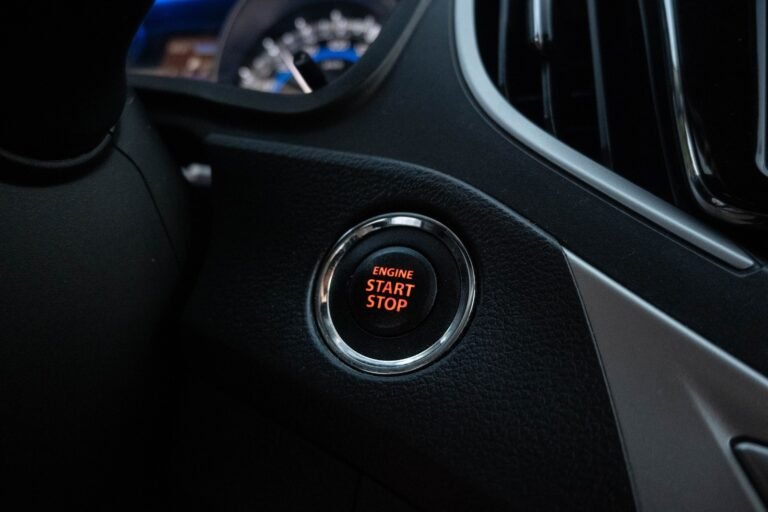


Reader Discussion & Questions
0 Comments